Our Work / Case Study

Traffic Monitoring

A vehicle monitoring system that reports road incidents in real time to a central system and to the vehicles and devices nearby.

2 min read Cloud & DevOps

The Outcome

A centralised web application serving more than a thousand mobile devices, with the event pipeline running at a thousand events per second across three Kafka clusters and ten or more Kubernetes clusters.

Sector
Traffic monitoring
Engagement
Ongoing

Built with

  • Kafka
  • Elasticsearch
  • Docker
  • Azure Kubernetes Service
  • Azure DevOps
  • Bitbucket
  • Nginx

Traffic Monitoring is a vehicle monitoring system that reports road incidents in real time, both to a central system and to the vehicles and devices near the incident. The project is available as a beta version.

Scale of the Platform

  • 1,000 events per second
  • 3 Kafka clusters
  • 10+ Kubernetes clusters
  • A centralised web application serving 1,000+ mobile devices

Technologies and Tools

LayerWhat runs it
Version controllingBitbucket
Continuous deploymentAzure DevOps Pipeline
ContainerizationDocker
Container managementAzure Kubernetes Service (AKS)
Load balancerAzure Load Balancer
HTTP cacheNginx
Data processingKafka, Elasticsearch

CI/CD for the Web Application

The centralised web application is managed on Bitbucket under a clean Git Flow pattern. The developers' IDE is wired directly into Bitbucket and configured with Azure DevOps Pipeline to build, test and deploy to Azure Web Apps without a manual step in between. Autoscaling is handled by the Azure Web App service itself.

The Traffic Monitoring pipeline: Visual Studio and Bitbucket into Azure DevOps Pipeline, deploying to Azure Web Apps
Build, test and deploy, with no manual step between the IDE and the running app.

Automated Incident Routing

The application is built on a publish and subscribe model running on Apache Kafka. Real-time road incident data is pushed into Kafka streaming APIs, where different brokers handle different incident types, and broker topics are created dynamically from the geocode of each incident. That is what lets a report reach the vehicles near it rather than everyone at once.
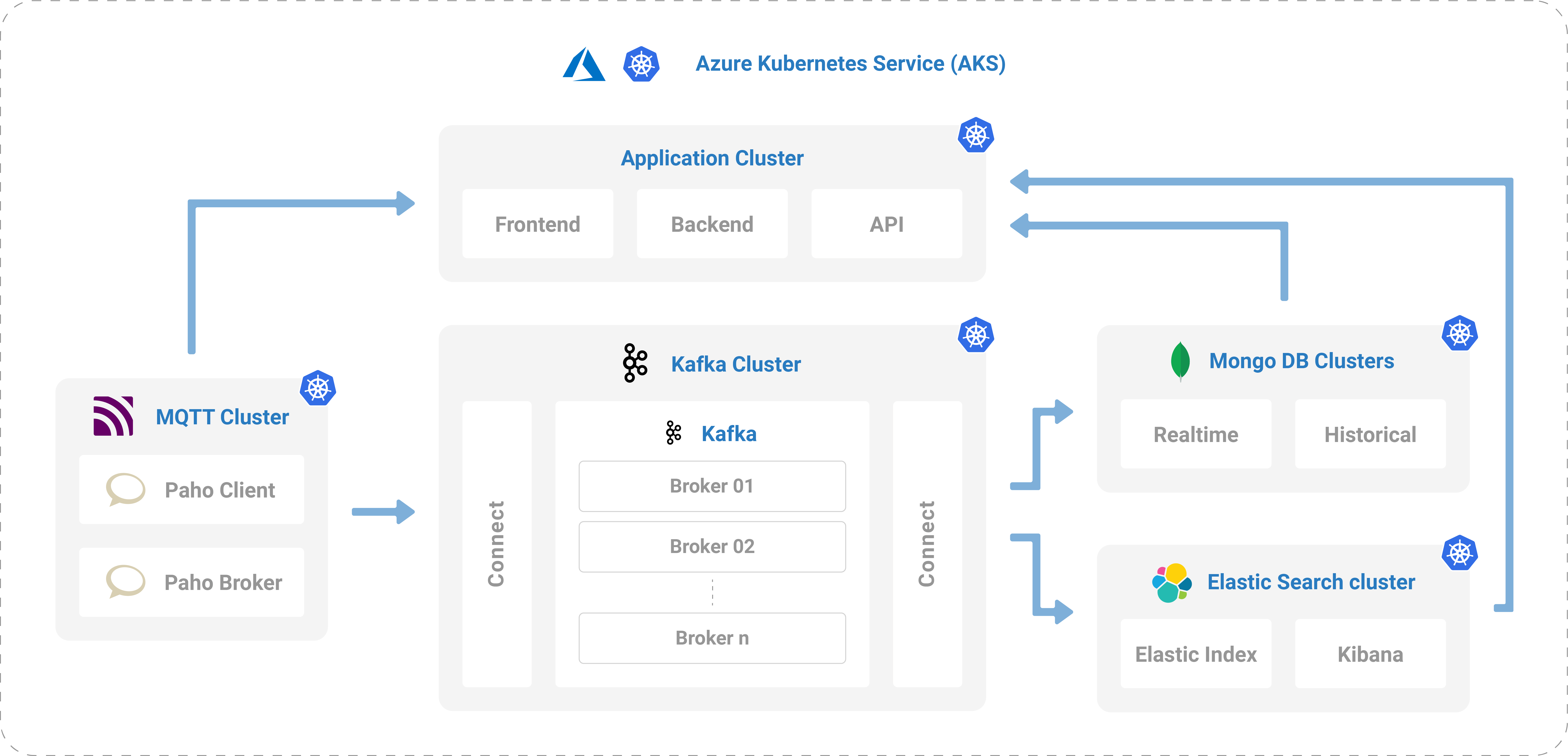
Incident routing: real-time incidents into Kafka streaming APIs, brokers per incident type, topics created from the incident geocode
Topics are created from the geocode, so proximity decides who hears about an incident.

Beyond the DevOps Role

The DevOps team set up Apache Kafka on Azure Kubernetes clusters, with one cluster assigned to staging and the rest to the live environment. Kafka connectors for MQTT Paho Server, MSSQL and Elasticsearch consume the real-time data and feed it to the relevant devices. Logstash and Kibana sit alongside the Elastic engine so logs and message data can actually be watched rather than guessed at.

The Outcome

Yours Could Be Next

What Are You
Shipping?

Every project on this shelf started as a conversation about a problem someone already had.